Designing a Governance Dashboard
Turning complex governance data into actionable insights.
Make governance easier to understand and act on.
Governance teams work with a large amount of information about their data, but that information is distributed across different signals, dimensions and levels of detail.
The challenge was to bring those signals together in a dashboard that helps users understand governance health, investigate gaps and determine where attention is needed.
A dashboard built around the decisions they need to make.
The primary user is the Data Steward, responsible for maintaining the quality, context and governance of data within their domain.
They need to move between four levels of decision-making:
Understand
How healthy is governance overall?
Diagnose
Where are the biggest gaps, and what is driving them?
Prioritise
Which issues and assets deserve attention first?
Act
Where should I investigate, and what can I do next?
How might we turn governance signals into a clear path from understanding a problem to deciding what to do next?
Finding the right balance of information.
I explored different ways of arranging and displaying the information as the dashboard grew in scope.
These were design explorations, not delivery phases. Each iteration added or rearranged content while refining the visual hierarchy.
High level design
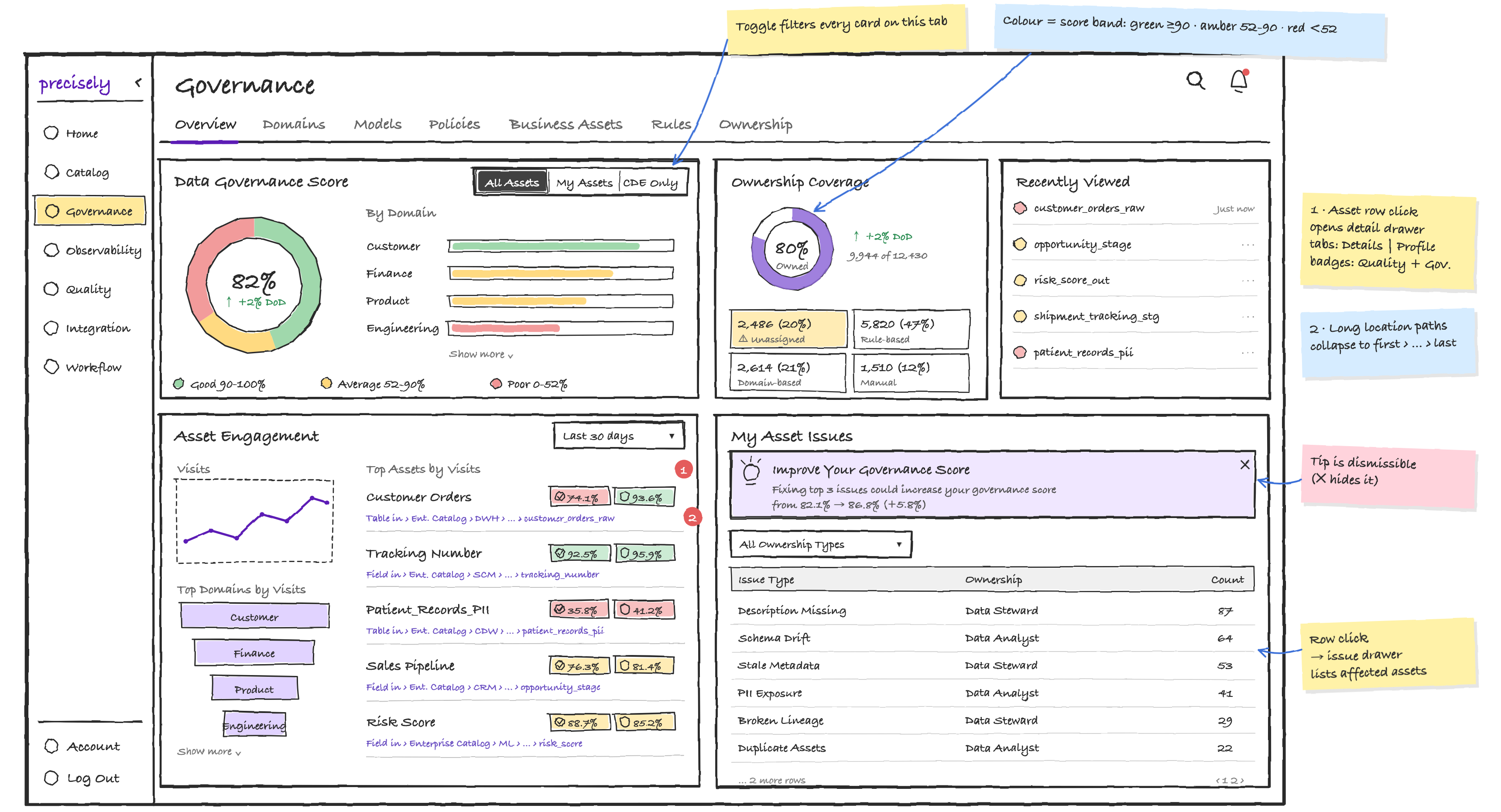
The high-level direction established the overall composition and relationships between the major content areas.
Iteration 1 - Connected governance metrics
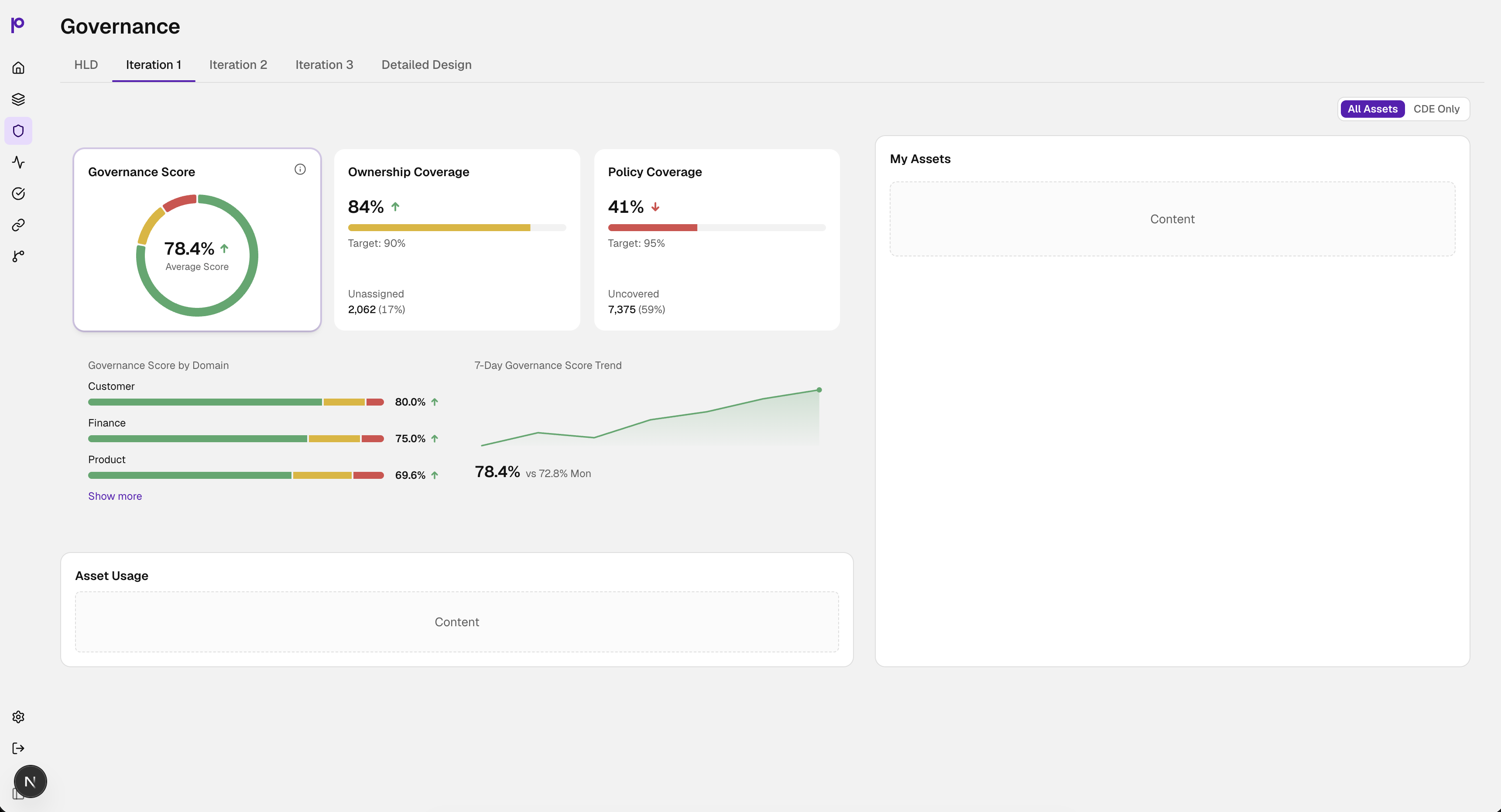
Governance Score, Ownership Coverage and Policy Coverage were explored as selectable cards. Selecting a metric updated the By Domain bars and 7-day trend.
Iteration 2 - Clearer metric roles
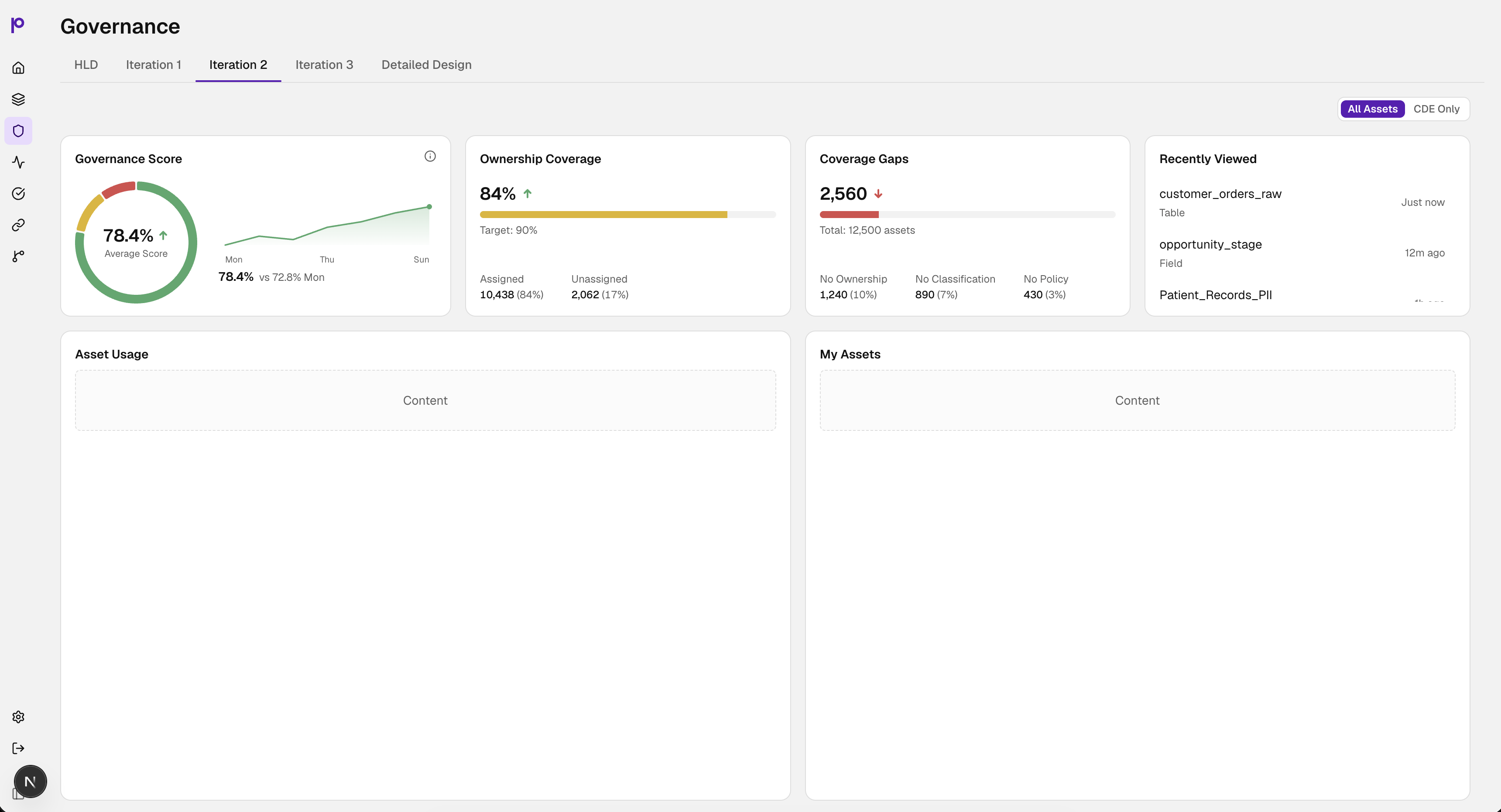
The next exploration moved to individual cards rather than clickable cards. The 7-day trend was reserved for Governance Score.
Iteration 3 - More governance context
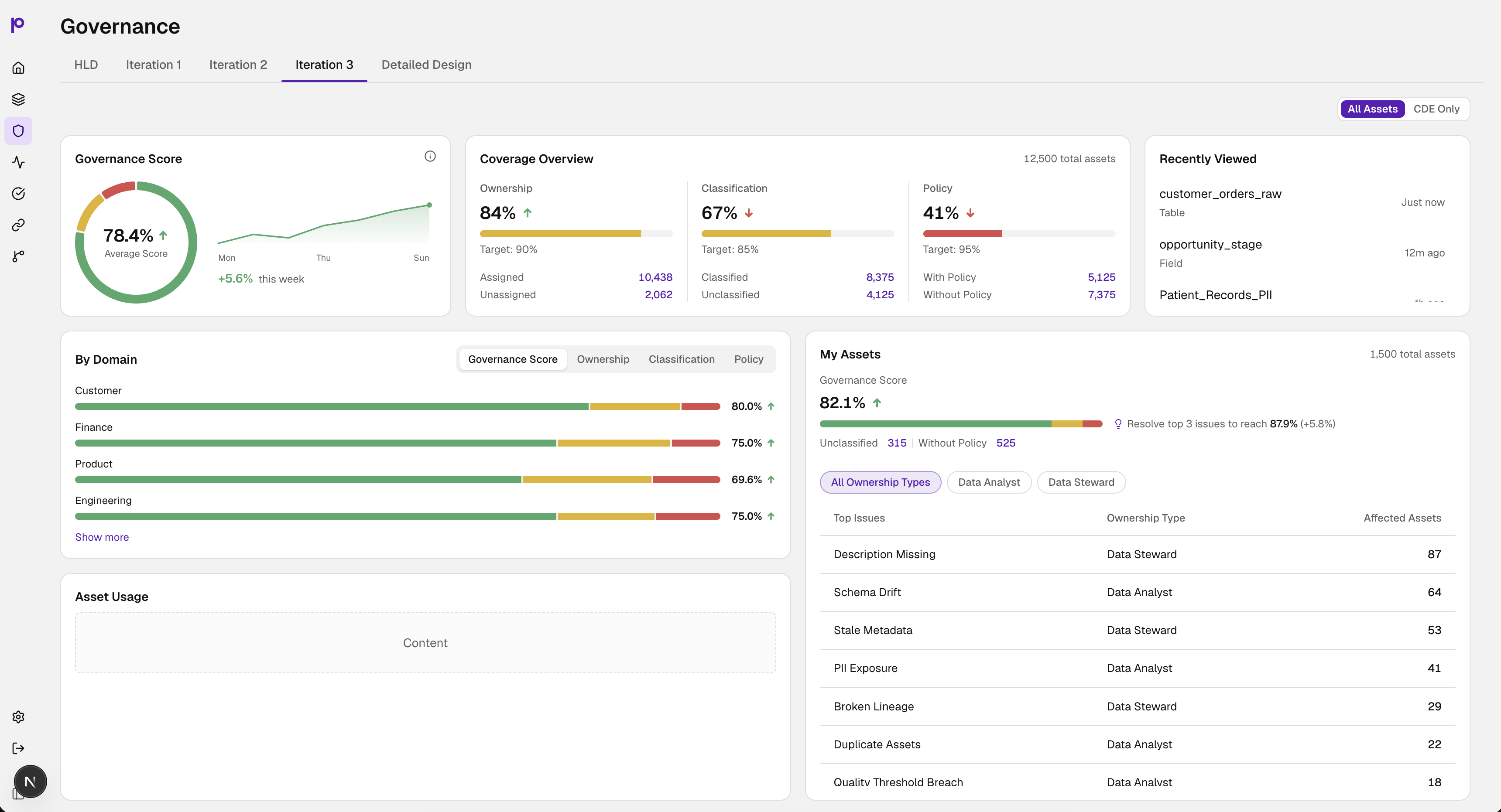
More content was introduced, while the By Domain chart was explored with a Select control to change the governance dimension being analysed.
Bring governance, assets and usage together.
The detailed design gave greater emphasis to the Top Assets card and added Top Domains by Visits, shifting the focus toward the assets and domains most relevant to investigation.
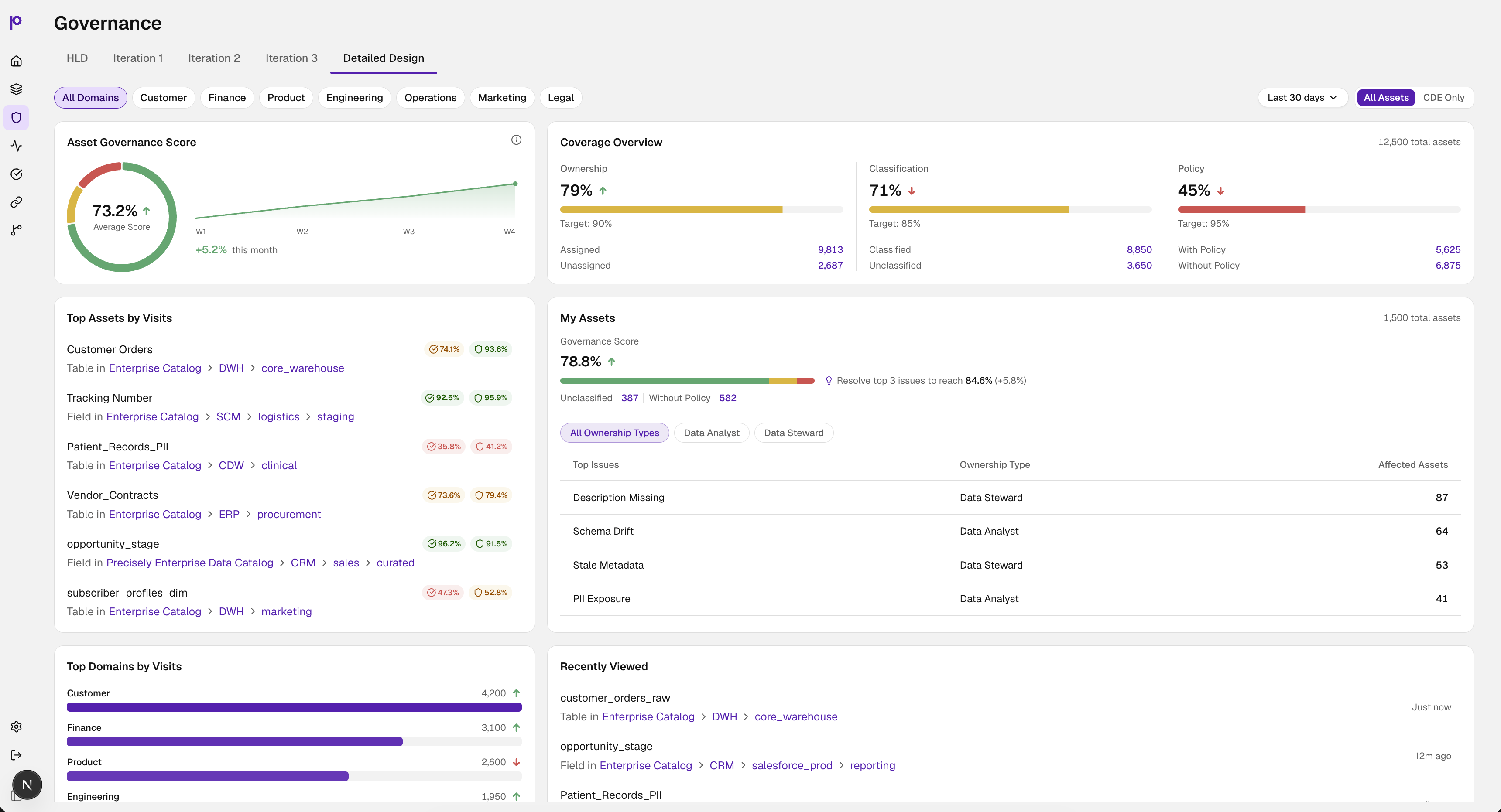
Understand - How are we doing?
The Asset Governance Score gives an immediate view of overall governance health, with a trend that provides context over time.
Diagnose - What is driving the score?
Ownership, Classification and Policy break the overall signal into the dimensions where coverage needs attention.
Prioritise - What matters to me?
My Assets shifts the experience from organisation-level governance to the assets relevant to the individual user. Resolve top 3 issues to reach 84.6% (+5.8%).
Act - Where should I investigate?
Top Assets by Visits, Top Domains by Visits, Recently Viewed and governance analysis provide context for investigation.
The experience moves from an overall governance view to focused investigation of the assets and issues that need attention.
Making the dashboard more than a collection of cards.
The detailed design was also explored as a working interaction model, using progressive disclosure to reveal more context when the user needs it.
Explore governance health
Start with the overall governance signal, then reveal supporting context.
Diagnose governance gaps
Move from the overall score to the dimensions behind it.
Prioritise what matters
Connect governance data with the assets and issues that require attention.
I didn't stop at static screens.
I translated the detailed design into a complete working prototype using GitHub Copilot.
I worked within a real GitHub workflow, using a repository, branches and pull requests to build and iterate on the experience.
Design
Translate the interaction model into a detailed interface.
Code
Use GitHub Copilot to turn the design into a working experience.
Interact
Evaluate hierarchy, behaviour and progressive disclosure in a realistic environment.
Refine
Use what the working experience revealed to refine the design.
The prototype represents the complete experience, rather than separate prototypes for each exploration.
From the working prototype to incremental product delivery.
The working prototype represents the complete experience I designed. The product is being delivered incrementally, with the current implementation establishing the core governance experience and subsequent phases extending it toward the full vision.
Design exploration
HLD → Iterations → Detailed Design
Working prototype
Complete interactive experience representing the full design direction.
Product delivery
Current implementation → subsequent delivery phases.
The core governance model is already taking shape in product.
The current implementation carries forward the core model established through the design: Governance Score, Ownership, Classification, Policy, Coverage Gaps, My Assets, Usage and adoption, and domain-level analysis.
The implementation has evolved in its layout and presentation while maintaining the underlying direction established through the design work.
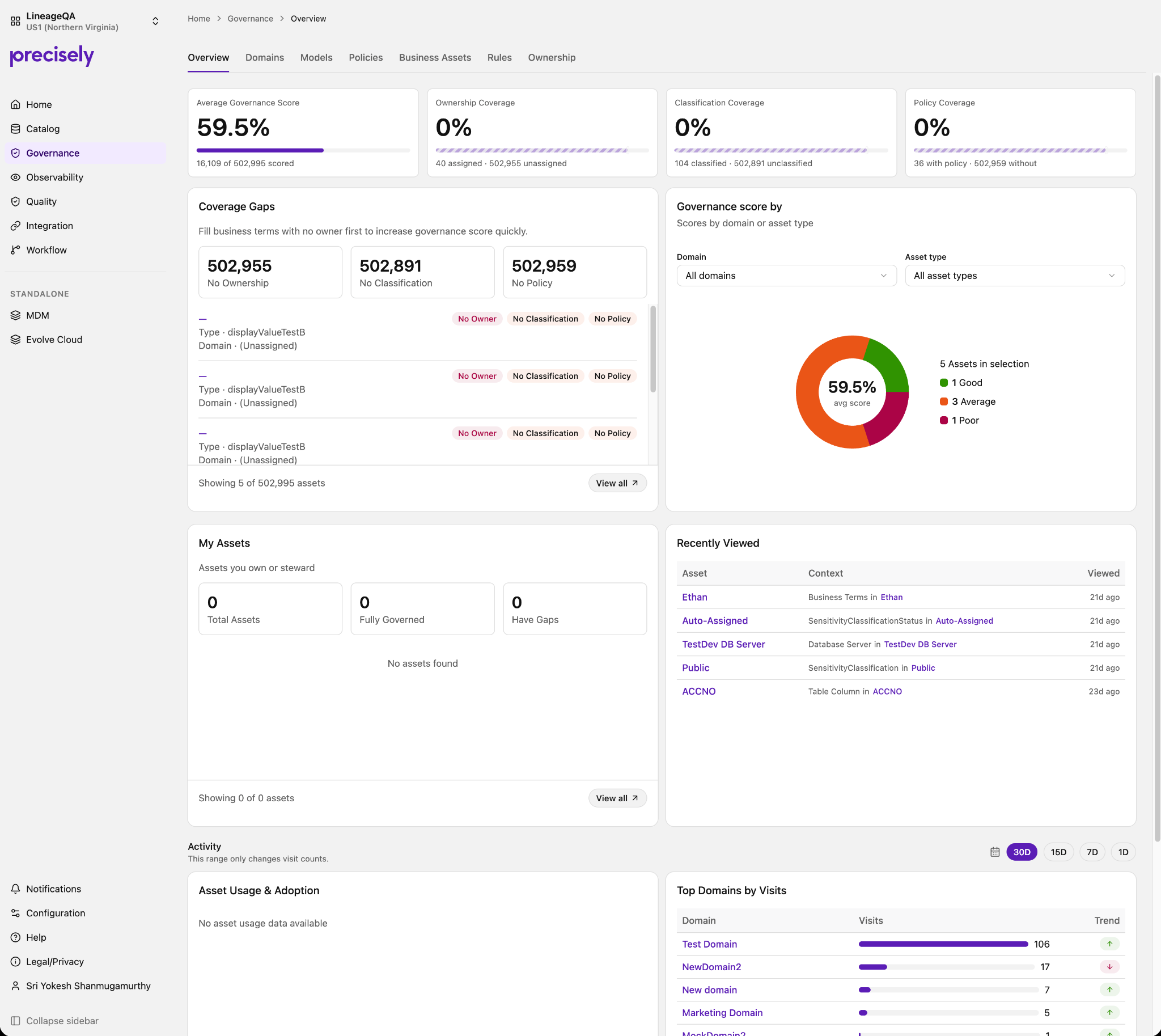
Designing within a broader product system.
The Governance dashboard was developed alongside related dashboard experiences, including Catalog and Quality.
I collaborated with other designers to align interaction patterns, information hierarchy and shared design-system components across the broader product.
Shared patterns
Align interaction patterns across related dashboard experiences.
Information hierarchy
Keep related product surfaces consistent in how they organise complex information.
Design system
Reuse shared components and conventions to create a connected product experience.
Evolving from visibility to intelligence.
The dashboard establishes a foundation that can progressively move from showing governance information to helping users decide what to do with it.
The experience is being delivered incrementally across three stages.
Make governance visible
Governance Score, Ownership, Classification, Policy, Coverage Gaps, domain and asset-type analysis, My Assets, and usage and adoption.
Make governance actionable
Prioritised issues, recommendations and suggested actions help users understand what deserves attention.
Make governance intelligent
Predictions, contextual recommendations, AI-assisted workflows and intelligent governance guidance extend the experience.
The working prototype demonstrates how the experience can evolve along this trajectory while the product is delivered incrementally.
From governance data to decision-making.
The dashboard evolved from a collection of governance metrics into an experience structured around the Data Steward's decision-making journey.
The resulting experience provides a foundation for progressively evolving governance from visibility, to action, to intelligence.
Understand
See governance health at a glance.
Diagnose
Understand the dimensions and gaps behind it.
Prioritise
Identify the issues and assets that deserve attention.
Act
Move from insight toward investigation.
A governance dashboard designed around the decisions behind the data.
The experience connects governance health, coverage, assets and usage in a single journey from understanding to investigation.
Design the decision path, not just the dashboard.
The most important design move was connecting multiple governance signals into a sequence that reflects how a Data Steward works: understand the state, diagnose the gap, prioritise attention and investigate what matters.